If you use Mobile myki on Google Wallet on an Android phone at Flinders Street, Southern Cross, or Melbourne Central, you have probably experienced the rush-hour barrier stall: you hold your phone over the myki reader, your screen flashes "Phone moved too fast" (or vibrates without the gate opening), and the crowd behind you forces you through an adjacent gate or leaves your trip unclosed.
Mobile Myki on Google Wallet: Why Missed Touch-Offs and Gate Read Errors Happen in Melbourne and How to Claim

When a Melbourne train station gate or suburban bus reader fails to register your Mobile myki touch-off, Transport Victoria's system can deduct a $2.85 Zone 1+2 default fare on your next touch-on instead of a $1.80 Zone 2 fare, or charge you twice if you tap a backup card to get out. Here is why Mobile myki gate read errors happen, what Transport Victoria's 2026 rules say, and how to claim a fare refund or balance transfer using your 15-digit Mobile myki ticket number.
The quick answer
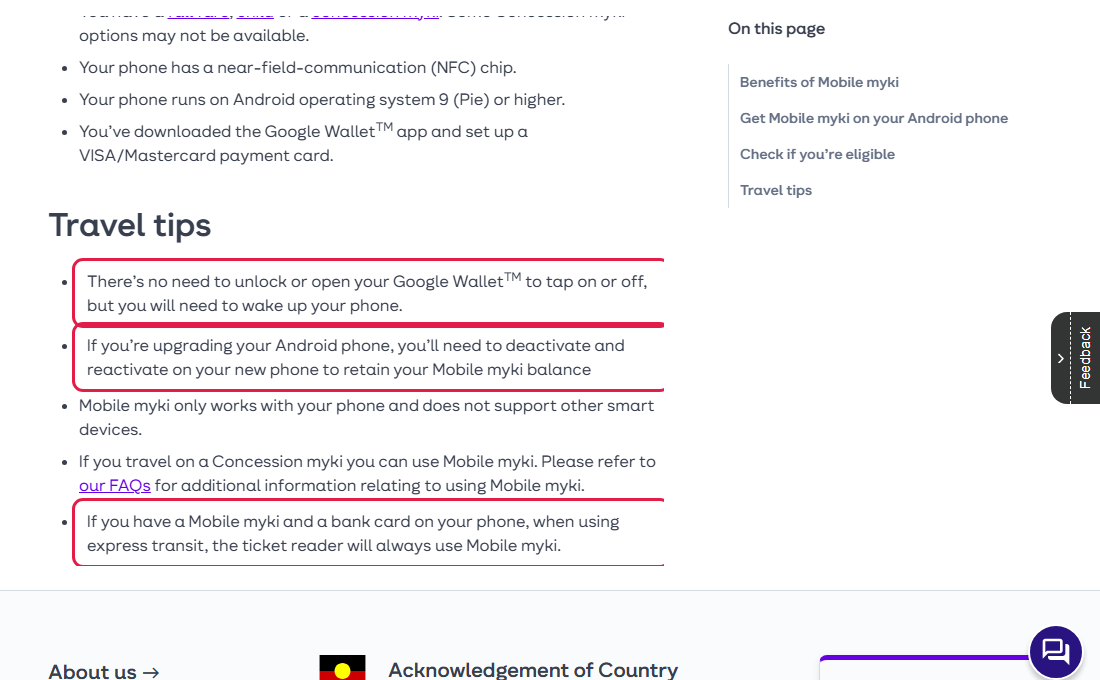
- Wake your screen and hover 1 cm above the reader. According to Transport Victoria's Tap on and off with myki guide and Mobile myki FAQs , you do not need to unlock your phone or open Google Wallet, but your screen must be awake (turned on) and held still about 1 cm above the centre of the reader until you hear the beep and see the green light.
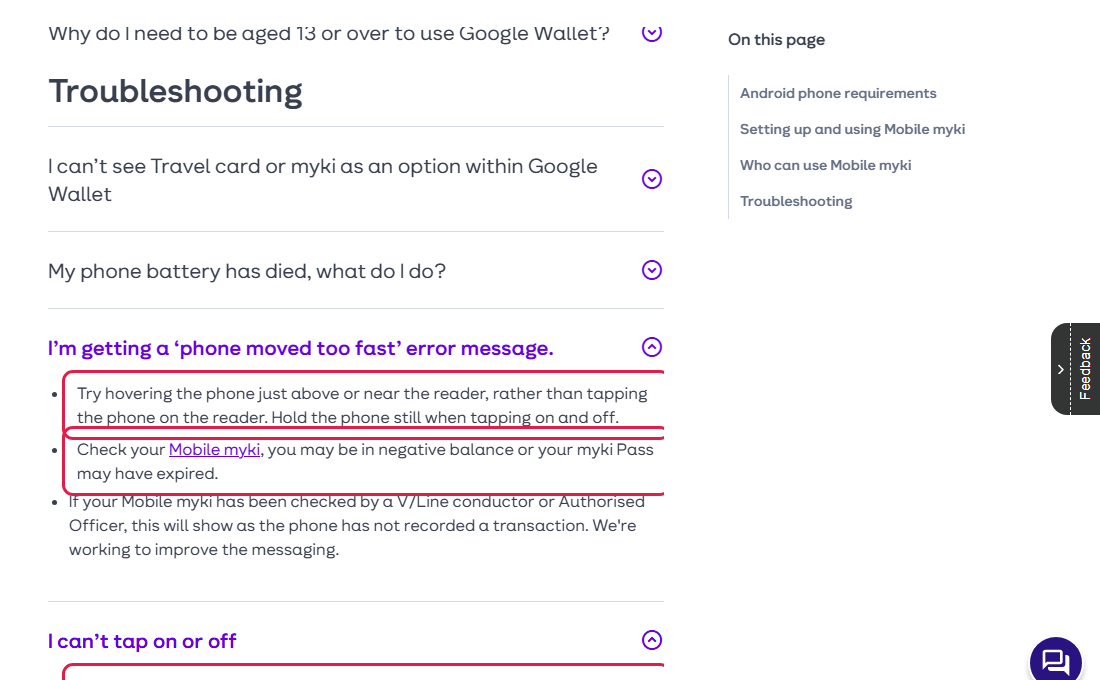
- "Phone moved too fast" does not always mean you moved your hand. Transport Victoria confirms this Google Wallet message can also appear when your myki Money is in negative balance, your myki Pass has expired, or right after an Authorised Officer or V/Line conductor scans your phone (which records no financial transaction).
- Samsung phones must set Google Wallet / Google Pay as the default Tap & Pay app. If Samsung Pay is set as your default NFC wallet, station gates and tram readers can fail to read Mobile myki properly.
- Missed touch-offs hit Zone 2 trips hardest ($2.85 vs $1.80). Failing to touch off on a metropolitan train or bus charges up to the 2-hour Zone 1+2 default fare ($2.85 Full fare / $1.42 Concession) instead of the 2-hour Zone 2 fare ($1.80 Full fare / $0.90 Concession), and the default fare is often deducted the next time you touch on.
- Faulty gate or reader overcharges qualify for a Transport Victoria refund. Use your 15-digit Mobile myki ticket number (found inside Google Wallet) to request a refund via Manage myki , the Transport Victoria public transport enquiries form , or 1800 800 007.
1. Why Mobile myki misses touch-offs and throws gate errors at Melbourne stations
Unlike a plastic smartcard whose copper antenna spans the entire card body, an Android phone's NFC (Near Field Communication) coil sits in a small spot (usually near the top camera bar or middle back panel) and relies on the phone's screen state to power transit emulation.
Transport Victoria's Mobile myki page and Mobile myki FAQs (checked 17 November 2026) identify four specific causes behind failed station gate reads and missed touch-offs:
1. Screen asleep or tapping the glass instead of hovering 1 cm above
On Mobile myki, you do not need to unlock your phone or open the Google Wallet app, but the screen must be turned on (awake). If your screen times out while you walk down the platform stairs, the reader will not detect your phone.
Transport Victoria also instructs Mobile myki riders to hover the phone about 1 cm above the reader and hold still until the beep sounds and the green light appears, rather than slapping the phone flat against the glass and pulling it away mid-handshake.
2. The false "Phone moved too fast" alert (negative balance, expired Pass, or ticket inspection)
In Google Wallet, a failed NFC handshake defaults to the generic Android message "Phone moved too fast". However, Transport Victoria's official troubleshooting guide notes three non-movement reasons this message pops up:
- Negative myki Money balance: A previous trip or delayed default fare pushed your Mobile myki balance below $0.00, blocking the next touch-on at the barrier.
- Expired myki Pass: Your 7-day or 28+ day Mobile myki Pass expired and there is no positive myki Money balance to cover the trip.
- Authorised Officer or V/Line conductor inspection: When an Authorised Officer or V/Line conductor checks your Mobile myki with a handheld reader, Google Wallet detects an NFC read that recorded no dollar transaction and displays a "Phone moved too fast" prompt even though your inspection succeeded.
3. Samsung Wallet / Samsung Pay NFC conflict
If you use a Samsung Galaxy phone with Samsung Pay (Samsung Wallet) active alongside Google Wallet, the two payment services can clash at myki gates. Transport Victoria advises Samsung users to set Google Pay / Google Wallet as the default Tap & Pay app:
- Open Settings > Apps > Choose default apps > Tap & pay on your Samsung phone.
- Select Google Wallet (Google Pay) as your default transit payment app.
- Confirm NFC is switched on under Settings > Connected devices > Connection preferences > NFC.
4. Does Google Wallet charge your bank card by mistake at myki readers?
Many commuters worry about card clash between their bank debit card and Mobile myki inside Google Wallet. Transport Victoria confirms that when Express Transit is active on your Android phone, standard myki readers automatically prioritise Mobile myki over your Visa or Mastercard. (By contrast, in New South Wales on Opal or in Queensland on Translink Smart Ticketing, tapping a digital wallet without a dedicated transit pass charges your default contactless bank card directly; remember too that in NSW, a forgotten tap-off on Opal is not refundable unless caused by a reader fault, outage, or service disruption.)
2. When a missed Mobile myki touch-off actually costs you extra money
Under Transport Victoria's Metropolitan train, tram and bus fares (checked 17 November 2026), failing to touch off with Mobile myki has two financial effects:
- Delayed deduction on your next touch-on: Transport Victoria notes that if you do not touch off on a train, bus, or Zone 1+2 tram, the system takes longer to close the trip and often deducts the default fare the next time you touch on, which can unexpectedly tip a low-balance Mobile myki into negative figures right in front of a station barrier.
- Zone 2 journeys overcharged at the Zone 1+2 default rate:
- 2-hour Zone 1+2 fare (and train/tram default fare): $2.85 Full fare / $1.42 Concession (weekday daily cap $5.70 Full fare / $2.85 Concession; weekend/public holiday daily cap $4.00 / $2.00).
- 2-hour Zone 2 only fare: $1.80 Full fare / $0.90 Concession (weekday daily cap $3.60 Full fare / $1.80 Concession).
If you travel strictly inside Zone 2 (for example, a suburban train trip between Dandenong and Berwick or a bus trip on a route that also enters Zone 1) and the station gate or bus validator fails to read your Mobile myki on exit, you are charged $2.85 instead of $1.80 (an extra $1.05 per 2-hour block, or $2.10 across a full weekday).
On the other hand, if you are travelling on a Zone 1 tram, remember you only touch on when boarding and never touch off (and inside Melbourne's CBD Free Tram Zone, do not touch your phone to the reader at all, or it will deduct $2.85).
3. How to find your 15-digit Mobile myki ticket number and claim a refund
According to Transport Victoria's Refund a myki or ticket policy , you can apply for a fare refund whenever faulty ticketing equipment charged you a higher fare, a severe service disruption prevented you from completing your trip after the 15-minute change-of-mind window, or a gate error caused a duplicate charge.
Step 1: Locate your 15-digit Mobile myki ticket number in Google Wallet
Every Mobile myki has a unique 15-digit ticket number (starting with `308425...`), just like a physical plastic card:
- Open the Google Wallet app on your Android phone.
- Tap your myki card on the home screen.
- Tap the three dots (`...`) or Details icon in the top right corner and scroll down to copy your 15-digit myki ticket number.
- (Recommended) Link and register that 15-digit number at Register your myki so your balance is protected and you can download full PDF travel statements.
Step 2: Submit a fare adjustment or Mobile myki balance refund
- For a faulty gate, frozen bus reader, or disruption overcharge:
- Note the date, approximate time, station or bus/tram route, and the fare deducted.
- Submit an online request via Manage myki or the Transport Victoria public transport enquiries form (select Refunds and reimbursements), or call 1800 800 007.
- For refunding and closing a Mobile myki balance:
- Purchased with an Australian Visa or Mastercard: Request a Mobile myki refund via the online enquiry form, by calling 1800 800 007, or at the Public Transport Information Centre at Southern Cross Station.
- Purchased with an international Visa or Mastercard (no Australian bank account): Transport Victoria's Mobile myki FAQs state that international payment card refunds cannot be processed by the call centre; you must visit the Public Transport Information Centre at Southern Cross Station in person before departing.
- Changing or resetting your Android phone (5-card annual limit):
- Do not delete your Mobile myki or factory-reset your phone while it is still active. Open Google Wallet, tap your Mobile myki, select Deactivate (which saves your card to your Google account), and then reactivate it on your new Android phone. Note that Google Wallet enforces a strict limit of 5 Mobile mykis per device over a 12-month period.
Check your Mobile myki statement for hidden default fares in seconds
Because Google Wallet only displays your recent tap notifications on screen, the easiest way to spot delayed $2.85 default fares or Zone 2 overcharges is to export your statement PDF from your registered myki account. Follow our step-by-step myki history download guide and drop your PDF into FareClaim .
FareClaim is a 100% free, volunteer-run commuter utility. Your myki statement is analysed entirely inside your browser and never uploaded to any server, flagging default fares, duplicate charges, and incomplete trips so you have the exact timestamps and amounts ready for Transport Victoria.
Scan your Mobile myki history free on FareClaim
Related guides
- How to Claim a Myki Refund or Reimbursement in Victoria: Faulty Readers, Train Delays and Card Balances
- Myki Default Fare and Refunds in Victoria: What Happens When You Don't Tap Off
- 5-Minute Fare Check: How to Check Your Opal, Go Card, Myki and SmartRider Travel History (2026)
- Default Fare for an Incomplete Trip: Opal, Go Card, Myki and SmartRider Compared (2026)
FAQ
Why does my Mobile myki say "Phone moved too fast" at Melbourne train gates?
While moving your phone away before the green light appears can trigger this message, Transport Victoria confirms "Phone moved too fast" also appears when your myki Money balance is negative (below $0), when your myki Pass has expired, or immediately after an Authorised Officer or V/Line conductor scans your phone. Wake your screen and hover the phone still about 1 cm above the centre of the reader until it beeps.
Do I need to unlock my Android phone to tap on and off with Mobile myki?
No. You do not need to unlock your phone or open the Google Wallet app, but your phone screen must be turned on (awake) for the myki reader to read your Mobile myki.
How do I get a refund on Mobile myki if a faulty reader overcharged me?
Find your 15-digit Mobile myki ticket number in the Google Wallet app (under the card's details menu), note the station or route, date, time, and fare charged, and lodge a refund request via Manage myki , the Transport Victoria enquiries form , or by calling 1800 800 007.
What happens if my phone battery dies while travelling on Mobile myki?
If your Android phone battery goes flat during a trip, Authorised Officers cannot read your Mobile myki and station barriers will not open, meaning you do not hold a valid ticket that can be inspected and any unclosed train or bus trip will trigger a default fare on your next touch-on. If you are switching to a new phone, always Deactivate your Mobile myki in Google Wallet first and reactivate it on the new handset to keep your balance.
Sources: Transport Victoria (Department of Transport and Planning), [Mobile myki](https://transport.vic.gov.au/tickets-and-payments/myki/myki-types/mobile-myki), [Mobile myki frequently asked questions](https://transport.vic.gov.au/help-and-support/public-transport-ticketing-help/mobile-myki-frequently-asked-questions), [Tap on and off with myki](https://transport.vic.gov.au/tickets-and-payments/myki/tap-on-and-off-with-myki), [Refund a myki or ticket](https://transport.vic.gov.au/help-and-support/public-transport-ticketing-help/refund-a-myki-or-ticket), and [Metropolitan train, tram and bus fares](https://transport.vic.gov.au/tickets-and-payments/fares/metropolitan-train-tram-and-bus-fares), all checked 17 November 2026.
Disclaimer: FareClaim is an independent, volunteer-run community resource and is not affiliated with Transport for NSW, Translink (Queensland), Transport Victoria / Public Transport Victoria (PTV), or Transperth / Public Transport Authority of WA. Fare figures and refund rules are sourced from official operator publications on the date noted and provided as general consumer information only.
Written by
Jason Tan
Advocate & Volunteer, FareClaimPublic transport commuter advocate and volunteer at FareClaim, helping everyday passengers detect fare glitches, avoid penalty overcharges, and claim refunds.