
In May, a Brisbane visitor posted on OzBargain that their Zip Visa card, sitting in Apple Wallet, wouldn't work on Sydney's Opal readers. The reader said Card Not Valid with an error number, while a different Mastercard in the same wallet worked fine. The same card worked on Translink at home, so why not in Sydney?
If your screen showed Card Not Valid 88 (or 87, 89 or 91), the number tells you what's wrong with the card you tapped.
The quick answer
- 87: the card is too old for contactless transport payments.
- 88: not enough money, the card's been reported lost or stolen, or you owe fares from an earlier trip.
- 89: a prepaid card, or a credit or debit card the Opal network doesn't accept.
- 91: not Amex, Mastercard or Visa, or not contactless-enabled.
- To travel right now: use an Opal card, an Opal single trip ticket or a different contactless card.
- Can you claim? Not for a card problem. A fare adjustment is only for things like a broken reader, an outage or a disruption.
Card Not Valid 88, 87, 89 and 91: what each Opal error code means
TfNSW lists the codes in the "Reasons your contactless payment may not work" section of its contactless payments FAQ . If the card or device still isn't recognised after you try again, "there is an issue with the card you are trying to pay with".
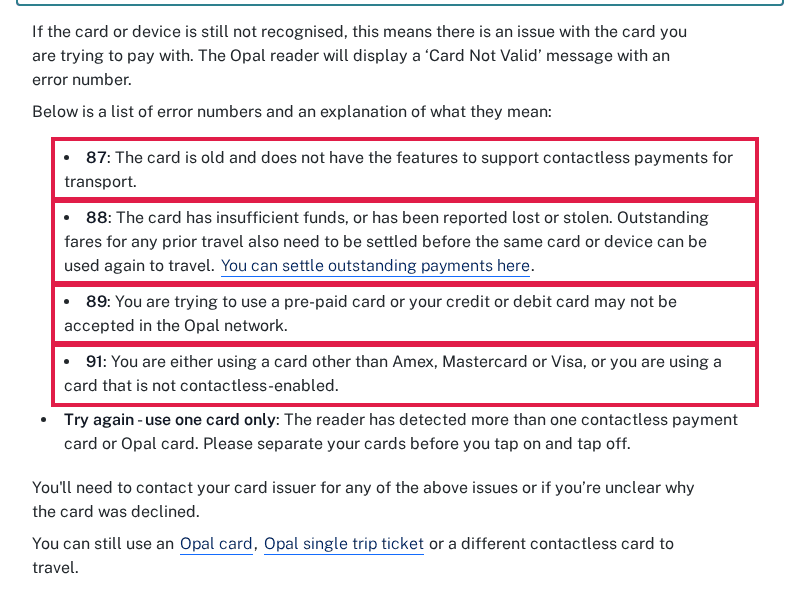
Error 87: the card is too old
TfNSW says the card "is old and does not have the features to support contactless payments for transport". In the OzBargain thread, the poster shared a TfNSW Customer Feedback reply that added two more things to check for 87. One was whether the card supports offline data authentication. The other was the expiry date of the card linked to your phone or watch. As a last resort, the reply suggested deleting the card from your digital wallet on every device and adding it back, because removing it from just one device may stop the details updating.
Card Not Valid 88: money, a lost card or unpaid fares
TfNSW says 88 means "the card has insufficient funds, or has been reported lost or stolen", and that "outstanding fares for any prior travel also need to be settled before the same card or device can be used again to travel".
So 88 can show up on a card with plenty of money in it, because an earlier fare didn't go through. Under clause 2.13 of the Opal Terms of Use , you can't travel with that card or device until unpaid fares are paid in full. The FAQ links to TfNSW's contactless login page to settle them. Our guide to the Opal overdue fare explains where that late charge comes from and how it shows up on your bank statement.
One OzBargain commenter said a past failed tap off or payment issue that led to a default fare gets a card blocked from being used again. TfNSW's list doesn't say that. What it does say is that unpaid fares block the card until they're settled.
Error 89: prepaid or not accepted
TfNSW: "You are trying to use a pre-paid card or your credit or debit card may not be accepted in the Opal network." This is the code the OzBargain poster matched their Zip card to. When the poster contacted TfNSW, the reply covered error 87 and, in the meantime, told them to use a different credit or debit card.
Error 91: wrong card type
The card is "other than Amex, Mastercard or Visa", or it isn't contactless-enabled. TfNSW's contactless payments page names only those three networks, either as a physical card or in Apple Pay, Google Wallet or Samsung Pay.
"Try again - use one card only"
No number here. The reader found more than one card, which is card clash. Take the card you want out of your wallet or phone case. If you've lost money to it, our card clash guide explains why TfNSW won't refund it.
What to do at the gate
For any of these codes, the FAQ says "You'll need to contact your card issuer". It also gives you a way through today: "You can still use an Opal card, Opal single trip ticket or a different contactless card to travel."
Don't board on a red light and hope for the best. A failed tap on means no trip has started on that card. TfNSW's tapping on and off page warns that if you don't tap on, you "could be fined for travelling without a valid ticket".
When it's an Opal card, not a bank card
For Opal cards there's no number in TfNSW's list. You get a red light and a two-tone ding, and the tapping page lists three reasons: the card wasn't read properly, "Insufficient balance" (shown on the reader screen), or a card that's "unreadable, faulty or invalid", which can also happen when it's tucked in a wallet next to other cards.
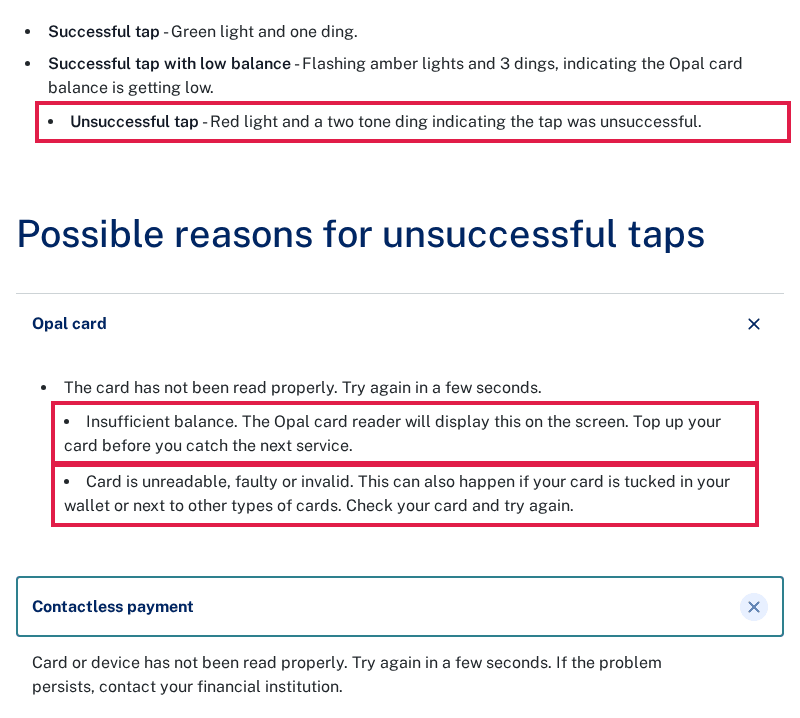
"Insufficient balance" means you're below the minimum to start a trip on that mode. For an adult card, TfNSW lists $4.33 for metro or train ($3.02 off-peak), $3.30 for bus or light rail ($2.31 off-peak) and $7.35 for ferry. Clause 1.66 of the Terms of Use says you must not start a trip if the reader declines your tap on for insufficient balance. So top up first.
Card Not Valid or a broken reader: only one can be claimed
This matters for your money. Card Not Valid is TfNSW telling you your card has a problem, so there's nothing to adjust. A reader that's dead or out of order is different. The tapping page says that if you've "been charged incorrectly due to an Opal reader not working, preventing you from tapping on or off, you can apply for a fare adjustment".
For contactless, TfNSW's contactless reimbursements page lists three accepted reasons: an Opal reader problem, an evacuation or power or equipment outage, and a default fare caused by a service disruption. You have 80 days. The same page rules out anyone who "tapped on or off incorrectly", so a forgotten tap off stays charged. Opal card claims go through the Opal card enquiry process (your Opal account if the card is registered) within 90 days of the charge, and our Opal fare adjustment guide has the wording to use.
Tip: if a reader really was broken, note the station or stop, the time and what the screen showed, and take a photo before you leave. Those details make a claim easier to back up.
Find the default fares hiding in your Opal history
A tap that never registered at the end of a trip turns into a default fare , which is the maximum for that service. On an Opal card you'll spot it by going through your history. Download it (our guide to downloading your Opal, go card or myki history shows where), then drop it into FareClaim . It flags trips with no tap off, missed transfers and duplicate charges, with the date, time and stop.

FareClaim is free and run by volunteers. Your file is checked in your browser and never uploaded. There are no ads, we take no cut, and we're not affiliated with TfNSW. FareClaim doesn't lodge claims: you send them yourself. It reads Opal card, go card and myki exports, but not contactless history yet.
Check your Opal card history free on FareClaim
Related guides
- Opal overdue fare: why 'TfNSW Opal OverdueFare' is on your statement
- Opal card clash: why mixing your phone, watch and card costs you
- Opal fare adjustment: how to apply and what to write
- Opal default fare: how much you pay when a tap goes wrong
FAQ
Does Card Not Valid 88 mean my bank card is cancelled?
Not necessarily. 88 also covers insufficient funds and unpaid Opal fares, so check those first. If you think the card was reported lost or stolen, that's for your bank to sort out.
I paid my overdue fare. Why does the gate still say 88?
TfNSW doesn't say how quickly a card is unblocked once fares are settled. If it keeps failing, contact your card issuer, as the FAQ advises for every code.
My card works on Translink. Why not on Opal?
Error 89 covers cards that "may not be accepted in the Opal network", and TfNSW only lists Amex, Mastercard and Visa. Another network accepting your card doesn't change what Opal readers take.
Does an expired card show error 88?
Not according to TfNSW's lists: 88 covers funds, lost or stolen cards and unpaid fares. TfNSW's regional bus contactless page lists a separate code, 84: the card has expired, which the Sydney list doesn't include. TfNSW's reply in the OzBargain thread tied expiry checks to error 87.
Sources: Transport for NSW, [Contactless payments FAQ](https://transportnsw.info/tickets-fares/contactless-payments/contactless-payments-frequently-asked-questions) ("Reasons your contactless payment may not work"), [Tapping on and tapping off](https://transportnsw.info/tickets-fares/fares/tapping-on-tapping-off) (unsuccessful taps, minimum balance), [Contactless payments](https://transportnsw.info/tickets-fares/contactless-payments), [Contactless reimbursements](https://transportnsw.info/tickets-fares/contactless-payments/contactless-reimbursements), [Opal refunds and fare adjustments](https://transportnsw.info/tickets-fares/opal/manage-your-card/opal-refunds-fare-adjustments), [Contactless payments on regional buses](https://transportnsw.info/contactless-regional-bus) and the [Opal Terms of Use](https://transportnsw.info/document/2114/opal-terms-of-use-june-2026.pdf) (clauses 1.66 and 2.13), all checked 27 October 2026. Commuter report: [OzBargain, "Zip Visa Card on Opal NSW Transport Info Not Working"](https://www.ozbargain.com.au/node/959169) (May 2026).