Nothing frustrates a Perth commuter faster than stepping up to a bus or station card processor at the end of a trip, holding your Transperth SmartRider against the target, and seeing an out-of-service screen or a red light that refuses to read your tag off. Because Transperth holds incomplete journeys and deducts the default fare the next time you tag on, a broken validator quietly charges you the full $3.50 cash Go Anywhere rate ($1.60 Concession) instead of your discounted $2.80 Autoload fare or $1.92 2-Section fare.
How to Claim a Transperth SmartRider Refund or Fare Adjustment: Faulty Validators, Overcharges and 13 62 13 Rules


Even worse, many commuters assume the SmartRider Balance Refund Form on the Transperth website is how you dispute an overcharge. It is not: that PDF form only closes your SmartRider card permanently. Here is how to separate a SmartRider trip fare adjustment from a card closure balance refund, what details you need before calling 13 62 13 or lodging a MyAccount enquiry, and how to check your tag history first.
The quick answer
- Trip fare adjustments vs card balance refunds use two completely different channels. If a faulty validator, gate outage, or service disruption caused a $3.50 ($1.60 Concession) default fare on an active card, request a fare adjustment through the Transperth InfoLine on 13 62 13, via your online Transperth MyAccount , or in person at a Transperth InfoCentre .
- Do not submit the SmartRider Balance Refund PDF unless you are closing the card. Transperth's SmartRider Balance Refund Form (PDF) cancels the SmartRider permanently and requires posting or handing in the physical card.
- Default fares are deducted on your next tag-on. Under Transperth's Using SmartRider rules , a missed tag-off charge is applied the next time you tag onto a train, bus, or ferry, which is why the overcharge often appears on the following day's commute.
- Keep four details ready when querying a faulty processor: the date and approximate time of the trip, the train station or bus route number (or 4-digit bus fleet number), where you boarded and alighted, and your 9-digit SmartRider number (`SR 0...`).
- Lost, stolen, or damaged registered cards transfer balance rather than paying out cash. If your registered SmartRider is lost, stolen, or faulty, Transperth transfers your remaining balance to a replacement SmartRider rather than issuing a cash refund.
Why a faulty tag-off processor costs you extra in 2026
Under Transperth's 2026 Fares schedule (effective 1 January 2026) , tagging on and off properly with a SmartRider gives you a 10% standard discount or a 20% Autoload discount off the cash fare:
- 2 Sections (up to 3.2 km): $1.92 with 20% Autoload ($2.16 with 10% SmartRider) vs $2.40 Cash default rate ($0.88 / $0.99 vs $1.10 Concession).
- Go Anywhere (all longer trips, up to 3 hours): $2.80 with 20% Autoload ($3.15 with 10% SmartRider) vs $3.50 Cash default rate ($1.28 / $1.44 vs $1.60 Concession).
- Elizabeth Quay Ferry: $1.92 with 20% Autoload vs $2.40 Cash default rate.
When a station gate reader or rear-door bus processor is frozen or offline and you cannot tag off, Transperth's system records an incomplete journey. The next time you tag on, the validator deducts the full Cash fare for the longest possible journey on that service: $3.50 Standard ($1.60 Concession) on trains and most bus routes.
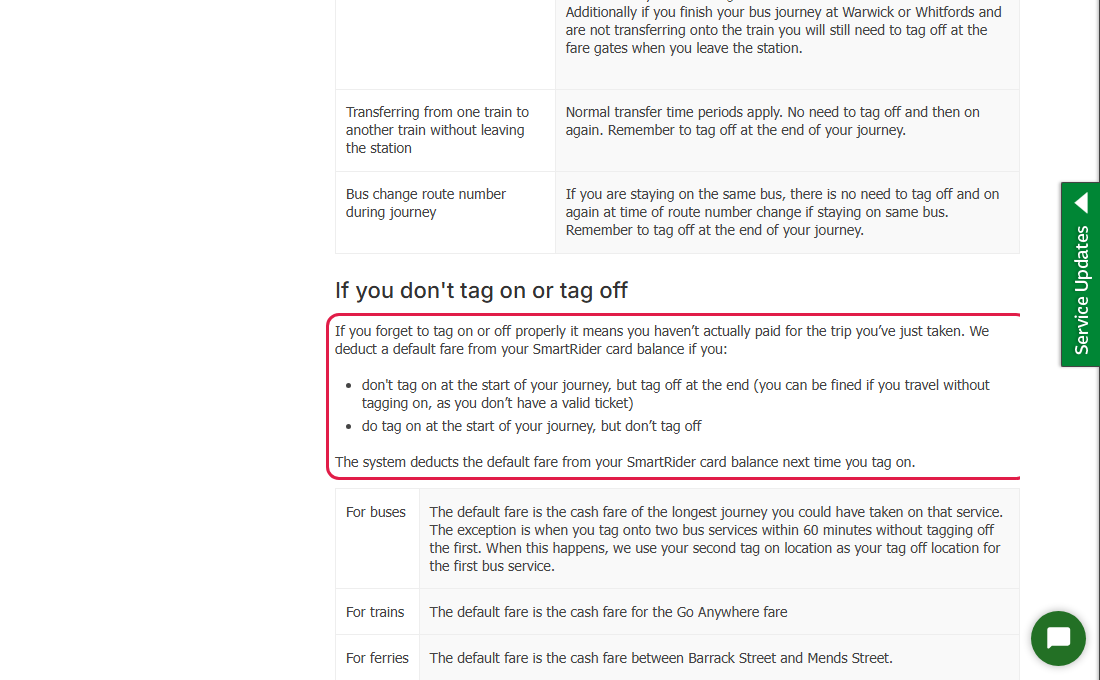
For a commuter with 20% Autoload taking a short 2-Section bus or train ride, a broken tag-off processor turns a $1.92 trip into a $3.50 charge, an overcharge of $1.58 on a single ride. If it happens on a Free Sunday (when SmartRider travel is $0.00 only if you both tag on and tag off), an unrecorded tag-off can turn a free Sunday trip into a $3.50 Monday morning deduction.
Which Transperth refund channel you actually need
Before lodging a request, match your situation to the right Transperth process:
Scenario 1: A broken validator, open station gate, or disruption caused a default fare
If you are keeping your SmartRider and want Transperth to adjust an incorrect default fare back to your card balance:
- Log in to Transperth MyAccount (`transperth.wa.gov.au`) and open your SmartRider Transaction History to confirm the exact date, time, and default fare deduction amount. Note that recent tags can take up to 24 to 48 hours to settle in online history after you next tag on.
- Record the four verification details:
- Your 9-digit SmartRider card number (printed on the back of the card starting with `SR`).
- The date and time you attempted to tag off.
- The train station barrier location or the bus route number and stop where the processor failed.
- Your actual origin and destination stops (especially important if your trip was 2 Sections or on a Free Sunday).
- Contact Transperth Customer Service:
- By phone: Call the Transperth InfoLine on 13 62 13 (7:00am to 6:00pm Monday to Friday, 8:00am to 6:00pm weekends and public holidays) and ask the operator to review the incomplete journey caused by the faulty processor.
- Online: Submit a SmartRider fare enquiry through the Transperth Feedback and Enquiries portal while signed into your MyAccount.
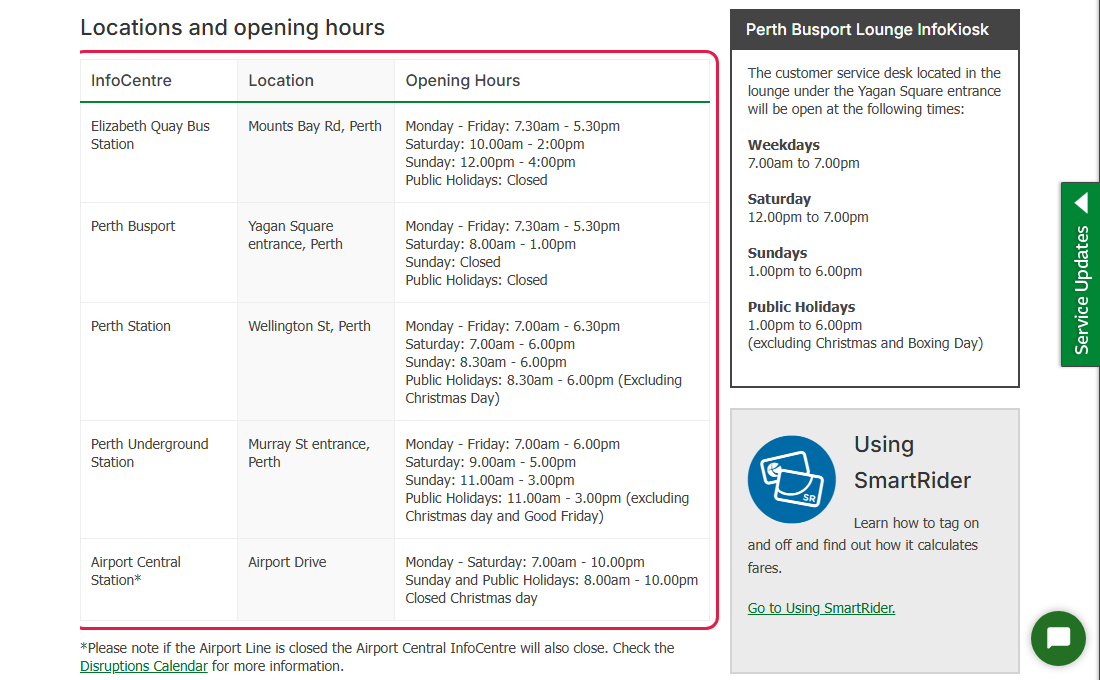
- In person: Visit a Transperth InfoCentre at Perth Station, Perth Underground, Elizabeth Quay Bus Station, or Redcliffe / Airport Central stations, where staff can inspect your card's chip log on the spot.
Scenario 2: Your SmartRider card itself stopped tagging (faulty card chip)
If your SmartRider fails to read across multiple different validators while other passengers tap through normally, the internal antenna in your card may be damaged:
- Take the card to any Transperth InfoCentre or retail sales outlet.
- According to Transperth's SmartRider FAQs , if the card has a manufacturing fault and has not been physically bent, cracked, or hole-punched, staff can issue a replacement and transfer your registered SmartRider balance and Autoload setup across.
Scenario 3: You are leaving Perth or closing a SmartRider with leftover credit
If you no longer need the card and want the remaining dollar balance paid into your Australian bank account:
- Download the official SmartRider Balance Refund Form (PDF) .
- Fill in your SmartRider number, contact details, and Australian BSB and account number.
- Attach the physical SmartRider card to the form and either hand it in at a Transperth InfoCentre or mail it to Transperth SmartRider, Reply Paid 70251, Perth BC WA 6849.
- Important conditions: Transperth states on the form that the card will be permanently cancelled upon processing, the initial $10 ($5 Concession) card purchase fee is non-refundable, and balances from lost or stolen cards cannot be refunded as cash (they can only be transferred to a replacement SmartRider if the card was registered).
Two built-in Transperth rules that prevent unnecessary claims
Before calling 13 62 13, check whether one of Transperth's automated exceptions already protected your fare:
- The 60-minute second-bus rule: If a bus rear-door validator did not read your tag-off, but you tagged onto a second Transperth bus within 60 minutes, Transperth's system automatically treats your second bus tag-on stop as the tag-off stop for the first bus. You will not be charged a full-route default fare.
- Warwick and Whitfords bus-train interchanges: When transferring directly between a bus and a train inside the paid interchange at Warwick or Whitfords stations, you do not tag off the train or tag onto the train. You only tag on and off the bus itself.
Check your SmartRider and multi-state travel history
Keeping track of delayed next-tap default deductions across 90 days of commuting is tedious when you are scrolling line by line through an online table. You can check our step-by-step transit history download guide or use FareClaim to spot default fares, duplicate charges, and missed transfer discounts in seconds.
FareClaim is a 100% free consumer advocacy project run by volunteers. Your travel history stays entirely inside your browser so you can quickly gather the exact dates, routes, and overcharge amounts you need before lodging a fare adjustment.
Check your transit statement free on FareClaim
Related guides
- Transperth SmartRider 20% Autoload Discount, Card Replacement and Balance Transfer Guide
- Transperth Free Sunday Travel & 2-Zone Cap: Why You Must Still Tag On and Off With Your SmartRider
- Transperth SmartRider Default Fare: What Happens When You Forget to Tag Off
- Default Fare for an Incomplete Trip: Opal, Go Card, Myki and SmartRider Compared (2026)
- Go Card Refund & Translink Fare Adjustment: Which Form You Need (2026)
FAQ
How do I claim a refund if a broken Transperth validator charged me a default fare?
Note the date, time, bus route or train station, and your 9-digit SmartRider number, then call the Transperth InfoLine on 13 62 13, submit an online enquiry via your Transperth MyAccount, or visit a Transperth InfoCentre. Do not use the SmartRider Balance Refund PDF unless you want to permanently cancel the card.
Why did my SmartRider get charged $3.50 the day after my trip?
Under Transperth's SmartRider rules, if a trip is not closed with a tag-off, the system deducts the default cash fare ($3.50 Standard / $1.60 Concession for a Go Anywhere journey) the next time you tag on, rather than at the moment you leave the station or bus.
Can I get a cash refund of my SmartRider balance if I lose my card?
No. According to Transperth's SmartRider Balance Refund terms, balances on lost or stolen cards cannot be refunded in cash. However, if your SmartRider was registered to your MyAccount, Transperth can block the lost card and transfer your remaining balance to a replacement SmartRider.
Is the $10 SmartRider card fee refundable when I close my card?
No. When you submit a SmartRider Balance Refund Form with your physical card to close the account, Transperth refunds your remaining travel credit to your nominated bank account, but the initial $10 Standard ($5 Concession) card issuance fee is non-refundable.
Sources: Transperth (Public Transport Authority of Western Australia), [Using SmartRider](https://www.transperth.wa.gov.au/smartrider/using-smartrider), [Transperth Fares (effective 1 January 2026)](https://www.transperth.wa.gov.au/tickets-fares/fares), [SmartRider FAQs](https://www.transperth.wa.gov.au/SmartRider/FAQs), [Contact Us & InfoCentres](https://www.transperth.wa.gov.au/contact-us/infocentres), and [SmartRider Balance Refund Form (PDF)](https://www.transperth.wa.gov.au/Portals/0/Asset/Documents/SmartRider/Transperth_%20SmartRider%20Balance%20Refund%20Forms.pdf), all checked 14 November 2026.
Disclaimer: FareClaim is an independent, volunteer-run community resource and is not affiliated with Transport for NSW, Translink (Queensland), Transport Victoria / Public Transport Victoria (PTV), or Transperth / Public Transport Authority of WA. Fare figures and refund rules are sourced from official operator publications on the date noted and provided as general consumer information only.
Written by
Jason Tan
Advocate & Volunteer, FareClaimPublic transport commuter advocate and volunteer at FareClaim, helping everyday passengers detect fare glitches, avoid penalty overcharges, and claim refunds.