Setting up Autoload on a Transperth SmartRider unlocks a 20% discount off every bus, train, and ferry fare in Perth, making a standard Go Anywhere trip $2.80 instead of $3.50 cash or contactless ($1.28 vs $1.60 Concession). However, as Perth commuters frequently report on `r/perth`, two common traps quietly wipe out that 20% discount or put your balance at risk: manually topping up an Autoload card at a station machine (which drops your discount back to 10%), and removing a lost SmartRider from your online My Account thinking that blocks the card (it does not).
Transperth SmartRider 20% Autoload Discount, Card Replacement and Balance Transfer Guide

Whether you want to activate or restore your 20% Autoload discount, replace a lost, stolen, or faulty SmartRider, or transfer your remaining travel balance onto a new card without losing your credit, here are Transperth's official rules and step-by-step procedures.
The quick answer
- Autoload gives a 20% discount vs 10% for manual top-ups and 0% for contactless bank cards. Under Transperth's Autoload rules , linking a bank account or credit/debit card for automatic top-ups ($20 to $250) triggers a direct debit whenever your SmartRider balance drops below $6 Standard ($3 Concession) and reduces your fares by 20%.
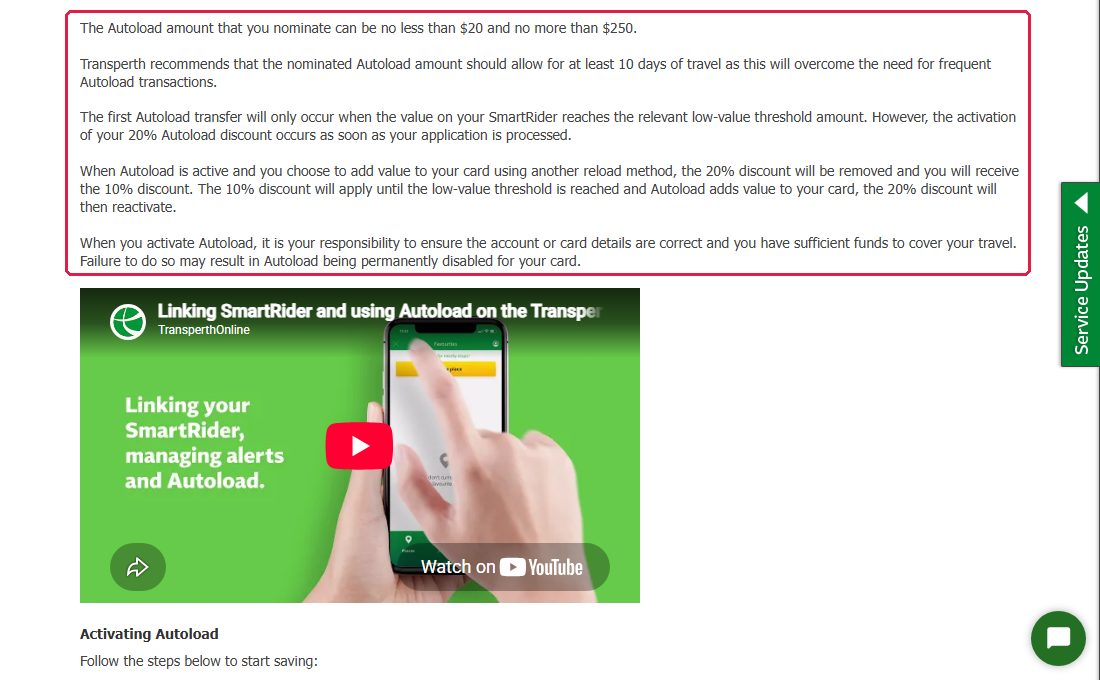
- Never manually top up an active Autoload card. If you add value to an Autoload SmartRider using cash, a station Add Value machine, BPAY, or a one-off online top-up, Transperth removes your 20% discount and reverts your card to the 10% discount until your balance falls below $6 ($3 Concession) and Autoload triggers again.
- You must tag on and off within 5 days to activate Autoload. After submitting an Autoload request in My Account and waiting 24 hours for processing, you must tag on and off a Transperth service within the next 5 days to load the pending Autoload action onto your card chip.
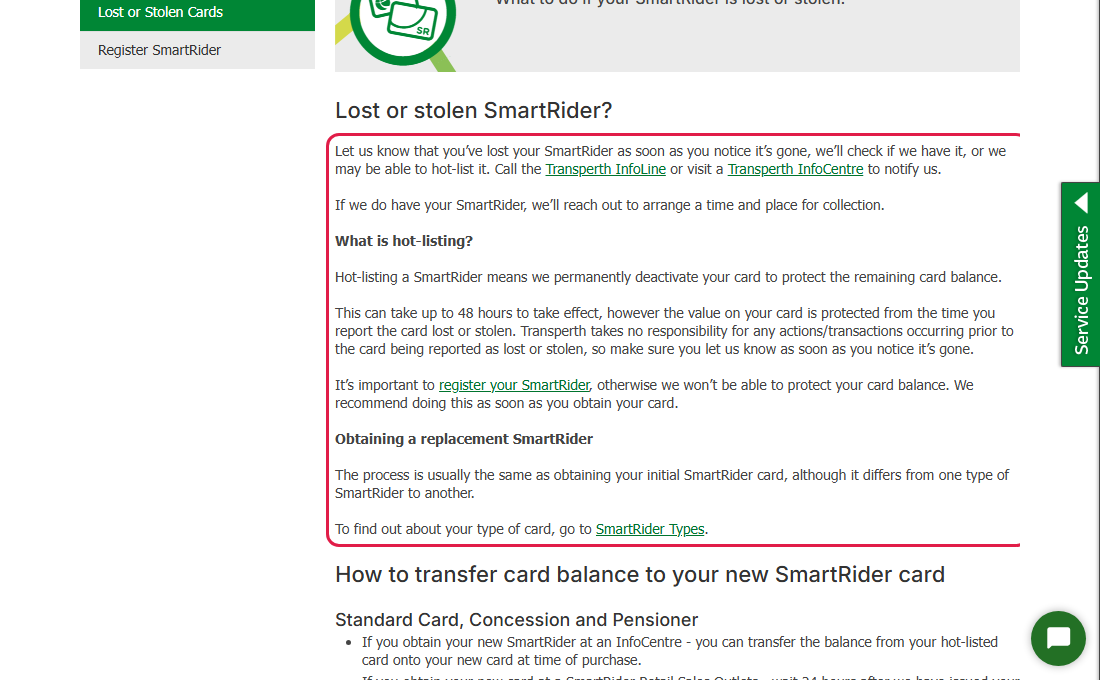
- Removing a lost SmartRider from My Account does NOT deactivate or hot-list it. According to Transperth's Lost or Stolen Cards guide , you must call the Transperth InfoLine on 13 62 13 or visit a Transperth InfoCentre to hot-list (permanently deactivate) a registered card and protect its balance from the time of your report.
- How balance transfers work on replacement cards: If you buy a replacement Standard, Concession, or Pensioner SmartRider ($10 Standard / $5 Concession card fee) at a Transperth InfoCentre, staff can transfer your hot-listed card balance immediately at the time of purchase. If you buy the replacement at a Retail Sales Outlet, you must wait 24 hours after issuance and call 13 62 13 to transfer the balance (Student SmartRider balances transfer automatically to a newly ordered replacement card).
How the 20% SmartRider Autoload discount works in 2026 (and how commuters accidentally lose it)
Under Transperth's 2026 Fares schedule (effective 1 January 2026) , Western Australia's statewide 1-Zone Go Anywhere flat fare and 2-Section short-trip fare have three pricing tiers depending on how you pay:
- Go Anywhere (all network trips beyond 2 Sections, up to 3 hours):
- SmartRider with 20% Autoload: $2.80 Standard ($1.28 Concession)
- SmartRider with 10% manual top-up: $3.15 Standard ($1.44 Concession)
- Cash / Contactless bank card or phone / Default Fare: $3.50 Standard ($1.60 Concession)
- 2 Sections (up to 3.2 km on a single bus or train):
- SmartRider with 20% Autoload: $1.92 Standard ($0.88 Concession)
- SmartRider with 10% manual top-up: $2.16 Standard ($0.99 Concession)
- Cash / Contactless bank card or phone / Default Fare: $2.40 Standard ($1.10 Concession)
- DayRider daily cap: $7.00 Standard ($3.20 Concession) across all payment methods.
For a full-fare commuter taking two Go Anywhere trips per workday, the 20% Autoload discount saves $1.40 per day compared to tapping a contactless debit/credit card or phone ($5.60/day vs $7.00/day), adding up to over $330 per year.
Three Autoload rules every Perth commuter needs to watch
- The manual top-up trap (20% drops to 10%): Transperth's Autoload conditions explicitly state that when Autoload is active and you add value using any other reload method, the 20% discount is removed and you only receive the 10% discount. Your 20% discount will not reactivate until you ride enough to push your balance below the $6 Standard ($3 Concession) threshold and let an automated Autoload top-up fire.
- The 24-hour wait and 5-day tag window: Because SmartRider is a card-based system where your Autoload status is written onto the physical card chip via a validator "pending action", activating Autoload is not instant:
- Log in to My Account on the Transperth website or app, register your SmartRider, and select Manage Autoload (nominating an amount between $20 and $250).
- Wait 24 hours for Transperth to process the request.
- Tag on and off within the next 5 days to load and activate Autoload on your card. If you cannot travel within 5 days, Transperth advises calling 13 62 13 at least 24 hours before you next travel so they can re-queue the activation.
- What happens if your bank card expires or a direct debit dishonours: When your SmartRider drops below $6 ($3 Concession) at a validator, the reader loads your Autoload credit immediately on the spot and debits your nominated bank account or credit card within 24 to 48 hours. If that bank debit fails (for example, because your linked debit card expired or had insufficient funds), Transperth disables Autoload on your card and claw-backs (removes) the credited value from your SmartRider balance on a subsequent tag.
Lost, stolen, or faulty SmartRider: how to hot-list your card and replace it
If your SmartRider goes missing or stops reading at validators, your first step depends on whether the card is lost/stolen or physically faulty.
1. Why you must call 13 62 13 or visit an InfoCentre to hot-list a lost card
A frequent mistake among Perth commuters is logging into Transperth My Account and clicking to remove a lost SmartRider from their profile. According to Transperth's SmartRider FAQs , removing a SmartRider from My Account does NOT hot-list or cancel the card: any Autoload, SmartParker, and travel balance remain live on the missing card!
Instead, follow the official hot-listing steps immediately:
- check registration status: Balance protection and balance transfers only apply to registered SmartRider cards. Unregistered cards cannot be hot-listed or recovered.
- Contact Transperth immediately: Call the Transperth InfoLine on 13 62 13 or visit a Transperth InfoCentre (Perth Station, Perth Underground, Elizabeth Quay Bus Station, or Redcliffe / Airport Central stations).
- Ask Transperth to hot-list the card: Hot-listing permanently deactivates the lost card. While it can take up to 48 hours for the block to propagate across every bus and station validator on the network, Transperth protects your remaining balance from the exact time you report the card lost or stolen. Any travel or usage before you report it cannot be recovered.
2. Replacing a lost, damaged, or faulty SmartRider
- Lost or physically damaged cards ($10 / $5 fee): Buying a replacement Standard SmartRider costs $10 ($5 for eligible Concession cards), which is non-refundable. You obtain a replacement the same way you obtained your original card (from a Transperth InfoCentre, a SmartRider Retail Sales Outlet , through your school or online student ordering portal for Student SmartRiders, or via the Seniors Card Centre for WA Seniors SmartRiders).
- Faulty SmartRider chip that stops tagging: If your SmartRider fails to read across multiple validators while other cards work, and the card has not been physically bent, cracked, hole-punched, or heat-damaged, take the physical card to a Transperth InfoCentre. Staff can test the internal chip and antenna and arrange a replacement and balance transfer on the spot.
Step-by-step: How to transfer your balance (and Autoload) to your new SmartRider
Once your old registered card is hot-listed and you have your replacement SmartRider in hand, Transperth's balance transfer process depends on your card type and where you bought the replacement:
| SmartRider Card Type | Where You Got the Replacement | How to Transfer Your Old Balance | | :--- | :--- | :--- | | Standard, Concession & Pensioner | Transperth InfoCentre | Staff transfer your hot-listed balance onto the new card immediately at the time of purchase | | Standard, Concession & Pensioner | SmartRider Retail Sales Outlet | Wait 24 hours after the new card is issued, then call the Transperth InfoLine on 13 62 13 to transfer the balance | | Seniors, Pensioners & Veterans | Issued via Seniors / Concession channel | Wait 24 hours after your new card is issued, then call 13 62 13 to transfer the balance | | Primary, Secondary & Tertiary Students | School or Online Student Replacement | The balance from your old Student SmartRider transfers automatically to your new card (if it does not appear, call 13 62 13) |
Don't forget to link your new 9-digit SmartRider number to My Account and Autoload
Transferring the dollar balance from a hot-listed card does not automatically register a retail replacement card in your My Account or move your 20% Autoload direct debit unless it is linked to the new 9-digit serial number (`SR 0...`):
- Log in to Transperth My Account (`transperth.wa.gov.au` or the Transperth app).
- Add your new replacement SmartRider card number to your profile.
- Open Manage Autoload to verify or enable Autoload on the replacement card, wait 24 hours, and tag on and off within 5 days so you continue receiving the 20% Autoload discount instead of dropping back to the 10% standard SmartRider rate.
Check your SmartRider and multi-state travel history
Whether you are checking if your 20% Autoload discount accidentally dropped to 10% (charging $3.15 instead of $2.80 on Go Anywhere trips) or verifying whether a faulty validator deducted a $3.50 default fare on your next tag-on, scrolling through raw online statements is slow. You can follow our step-by-step transit statement download guide or use FareClaim to scan your travel history for default fares, duplicate charges, and missed discounts in seconds.
FareClaim is a 100% free consumer resource built by volunteers. Everything runs locally inside your browser with zero uploads, so you can quickly spot every overcharge before calling 13 62 13.
Check your transit statement free on FareClaim
Related guides
- How to Claim a Transperth SmartRider Refund or Fare Adjustment: Faulty Validators, Overcharges and 13 62 13 Rules
- Transperth SmartRider Default Fare: What Happens When You Forget to Tag Off
- Transperth Free Sunday Travel & 2-Zone Cap: Why You Must Still Tag On and Off With Your SmartRider
- Go Card Balance Transfer and $10/$5 Deposit Refund: What to Do When Your Go Card Expires, Is Lost, or Has Leftover Credit
- Expired or Negative-Balance Myki Card: How to Replace an Expired Myki for Free and Transfer Your Balance
FAQ
How do I get the 20% SmartRider discount on Transperth?
To get the 20% fare discount, register your SmartRider in Transperth My Account, select Manage Autoload to link a bank account or credit/debit card (with a reload amount between $20 and $250), wait 24 hours, and tag on and off a Transperth service within 5 days. Once active, your card automatically reloads whenever your balance drops below $6 Standard ($3 Concession).
Why did my SmartRider Autoload discount drop from 20% back to 10%?
Under Transperth's official Autoload rules , if you manually add money to an Autoload SmartRider using any other method (such as cash, an Add Value machine, BPAY, or a manual online top-up), the 20% discount is removed and replaced by the 10% discount. The 20% discount only returns after your card balance drops below $6 ($3 Concession) and an automated Autoload transfer takes place.
Does removing a lost SmartRider from My Account cancel the card or stop Autoload?
No. Transperth explicitly warns in its SmartRider FAQs that removing a card from your online My Account only unlinks it from your web profile while leaving the card balance, Autoload, and SmartParker active on the physical card. You must call the Transperth InfoLine on 13 62 13 or visit an InfoCentre to hot-list (permanently deactivate) a lost or stolen SmartRider.
How do I transfer my balance from a lost or damaged SmartRider to a new card?
First, call 13 62 13 or visit a Transperth InfoCentre to hot-list your old registered SmartRider. If you buy your replacement SmartRider at an InfoCentre, staff can transfer the balance on the spot at the time of purchase. If you buy a replacement at a Retail Sales Outlet (or receive a replacement Seniors/Veterans card), wait 24 hours after the new card is issued and call 13 62 13 to have the balance moved across.
Sources: Transperth (Public Transport Authority of Western Australia), [SmartRider Autoload](https://www.transperth.wa.gov.au/SmartRider/Autoload), [Lost or Stolen Cards](https://www.transperth.wa.gov.au/SmartRider/Using-SmartRider/Lost-or-Stolen-Cards), [SmartRider FAQs](https://www.transperth.wa.gov.au/SmartRider/FAQs), [Using SmartRider](https://www.transperth.wa.gov.au/smartrider/using-smartrider), and [Transperth Fares (effective 1 January 2026)](https://www.transperth.wa.gov.au/tickets-fares/fares), all checked 21 November 2026.
Disclaimer: FareClaim is an independent, volunteer-run community resource and is not affiliated with Transport for NSW, Translink (Queensland), Transport Victoria / Public Transport Victoria (PTV), or Transperth / Public Transport Authority of WA. Fare figures and refund rules are sourced from official operator publications on the date noted and provided as general consumer information only.
Written by
Jason Tan
Advocate & Volunteer, FareClaimPublic transport commuter advocate and volunteer at FareClaim, helping everyday passengers detect fare glitches, avoid penalty overcharges, and claim refunds.