Nothing slows down a Melbourne morning commute faster than tapping your myki card at a Flinders Street or suburban station barrier only for the screen to flash red because your card has quietly passed its 4-year expiry date, or because an unclosed trip from earlier in the week pushed your myki Money into a negative balance below $0.00.
Expired or Negative-Balance Myki Card: Free Replacement, 2-Year Extension and Balance Transfer Rules

When Melbourne commuters ask on r/melbourne whether an expired or negative-balance myki means paying another $6 for a new Full Fare card (or losing leftover credit), the answer under Transport Victoria's 2026 ticketing rules is no. Most standard myki cards can have their expiry extended by two years on the spot without swapping plastic, and cards that are more than 90 days past expiry qualify for a free replacement myki with your balance transferred across. Here is the exact step-by-step guide to extending, replacing, transferring, or clearing an expired or negative-balance myki in Victoria.
The quick answer
- Physical myki cards expire after 4 years (Mobile myki after 2 years). According to Transport Victoria's Replace a myki, ticket or student ID guide , plastic myki smartcards expire four years after first issue, while Mobile myki on Google Wallet expires after two years.
- Extend an expiring myki by 2 years for free (within 90 days of expiry). Under Transport Victoria's Extend an expiring myki rules , if your eligible myki is approaching expiry or expired 90 days ago or less, scanning it on a station myki machine, via the PTV App (`Scan myki - check balance`) on an NFC phone, at a myki retailer, or at a staffed train station immediately extends the expiry date by two years.
- You cannot extend an expiring myki by tapping on a train, tram, or bus gate. Station gates and on-board tram or bus readers do not write the 2-year expiry update; you must scan the card on a myki machine, retailer terminal, or the PTV App before you travel.
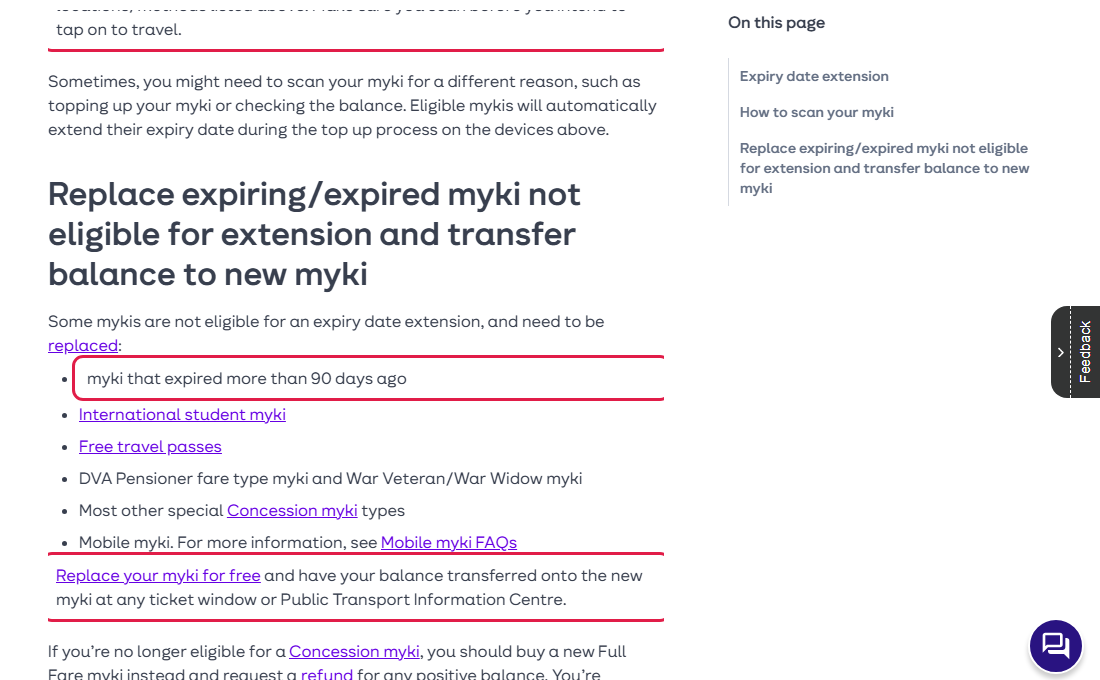
- Expired more than 90 days ago? Get a free replacement card and balance transfer. Cards expired for more than 90 days (plus Youth myki, International Student, and certain special Concession cards) cannot be extended, but any staffed train station ticket window or the Public Transport Information Centre at Southern Cross Station will replace the card for free and transfer your balance. You can also order a free postal replacement online using your 15-digit card number (arrives in 10 business days, with myki Money transferring in up to 7 days and a myki Pass in up to 36 hours).
- How negative balances happen and transfer: If a previous trip or delayed $2.85 Zone 1+2 default fare drops your myki Money below $0.00, you cannot tap on again until you top up back to $0.00 or above. If an expired card holds a negative balance, that negative balance carries across or must be cleared when replacing the card.
1. How to extend an expiring myki by 2 years without changing cards
Before you queue at a ticket counter or order a replacement card online, check whether your plastic myki can simply be extended. Transport Victoria's Extend an expiring myki guide (checked 20 November 2026) confirms that eligible Full Fare, General Concession, Seniors, and Child myki cards can have their expiry date pushed out by an additional two years from the original expiry date.
Four ways to apply the 2-year expiry extension immediately
- On your smartphone via the PTV App (fastest): Open the latest version of the PTV App on an NFC-enabled iPhone or Android phone, go to the myki menu, tap Scan myki - check balance, and hold your plastic myki card against the back of your phone. If eligible, the app writes the 2-year extension to the card chip immediately.
- At a station myki machine: Place your myki on the card cradle of any large myki machine at a metropolitan train station, accessible tram stop, or bus interchange and wait for your card details to load on screen. Simply loading the balance screen (or topping up) automatically triggers the 2-year expiry extension.
- At a myki retailer: Hand your card to a participating myki retailer (such as a 7-Eleven or newsagent) and ask them to scan or top up the card on their retail terminal.
- At a staffed train station or Southern Cross Station: Present your card at any staffed metropolitan or V/Line ticket window, or at the Public Transport Information Centre at Southern Cross Station (concourse near Spencer Street and Collins Street, open Monday to Friday 7:30am to 6:30pm, weekends and public holidays 9:00am to 5:00pm).
Crucially, Transport Victoria warns that scanning a myki is different from tapping on. You cannot extend an expiring myki at a station barrier gate or an on-board bus or tram reader, and if you hold an active myki Pass, you should scan the card to apply the 2-year extension before the original expiry date passes.
Which myki cards cannot be extended (and must be replaced instead)?
Transport Victoria lists six card categories that are not eligible for a 2-year expiry extension and require a free replacement card instead:
- Any myki card that expired more than 90 days ago
- Youth myki cards (you can replace a Youth myki, or switch to a Full Fare card once eligibility ends, but you cannot extend its expiry date)
- International student myki cards
- Free travel passes
- DVA Pensioner fare type myki and War Veteran / War Widow myki cards
- Mobile myki on Google Wallet (which expires after two years)
2. How to replace an expired, faulty, or lost myki for free and transfer your balance
If your plastic myki expired more than 90 days ago, has a cracked antenna that no longer reads at gates, or is one of the non-extendable card types above, you do not have to pay the standard $6 Full Fare ($3 Concession) card purchase fee.
According to Transport Victoria's Replace a myki, ticket or student ID policy (checked 20 November 2026), you can choose between an immediate over-the-counter swap or an online postal replacement:
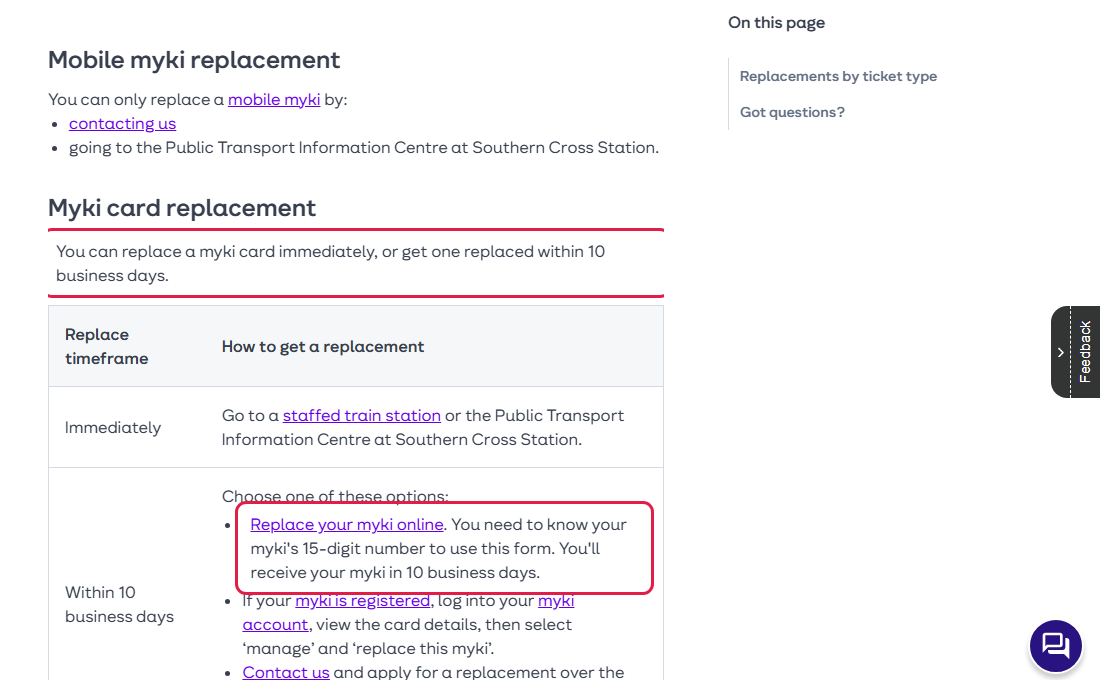
Option A: Immediate replacement on the spot (staffed train station or PTV Hub)
Take your expired, damaged, or defective physical myki card (registered or unregistered) to any staffed train station ticket window or the Public Transport Information Centre at Southern Cross Station:
- Staff will replace your expired or faulty myki card for free on the spot.
- When replacing an intact expired card over the counter, your myki Money balance and any active myki Pass can be transferred to the new card immediately.
- If your card is damaged or defective (for example, the chip cannot be read directly by the station terminal), Transport Victoria notes that extra processing time is required to move your funds across: up to 7 days for myki Money and up to 36 hours for a myki Pass.
Option B: Free online or phone replacement (10 business days by post)
If you do not live near a staffed train station, or if your registered myki was lost or stolen:
- Find your 15-digit myki card number (starting with `308425...`, printed on the back of your card, on old top-up receipts, or inside your online account).
- Log in to Manage myki , view your card details, and select Manage > Replace this myki (or use the online replacement form on the Replace a myki page , or call 1800 800 007).
- Transport Victoria will block the old card, protect your balance from the moment you report it, and post a free replacement card to you within 10 business days.
- Once ordered, it takes up to 7 days for your old myki Money balance (and up to 36 hours for a myki Pass) to transfer onto the replacement card. Make sure you also re-enable Auto Top Up on the new card number once it arrives.
- Card cost reimbursement tip: Transport Victoria explicitly notes on its Replace a myki page that if you already had to buy a new myki card to travel while waiting for your registered card replacement, you can contact Transport Victoria (`1800 800 007` or online enquiry) to request a reimbursement of the cost to buy that myki card.
(Note: If an unregistered physical myki is lost or stolen and you do not have the card to hand in at a staffed station, Transport Victoria cannot replace it or recover the balance. Always register your new card at [Register your myki](https://transport.vic.gov.au/tickets-and-payments/myki/register-your-myki).)
3. Why a myki card goes into negative balance (and what happens when you replace it)
Melbourne commuters frequently discover a negative myki Money balance (such as `-$1.45` or `-$2.85`) when trying to scan or replace an old card. Under Transport Victoria's Metropolitan train, tram and bus fares and Tap on and off with myki rules (checked 20 November 2026), a myki balance drops below $0.00 for two distinct reasons:
- You only need a $0.00+ balance to tap on, not the full fare upfront: As long as your myki Money balance is at least $0.00 (not negative) when you tap on to start a journey, the gate or validator lets you board. When you tap off at the end of a $2.85 2-hour Zone 1+2 trip (or $1.80 Zone 2 trip), the fare is deducted from whatever small positive balance was on the card, leaving the card in negative balance until your next top-up.
- Delayed default fares deducted on your next touch-on: If you could not tap off on a previous train, bus, or Zone 2 tram trip (or had a Mobile myki Google Wallet gate read error ), the system closes the journey later and deducts the $2.85 Full fare ($1.42 Concession) 2-hour Zone 1+2 default fare the next time you tap on, which can push your balance below $0.00 right at the barrier.
How to fix or dispute a negative myki balance
- If the negative balance came from a valid trip you took: You must top up at least enough to bring the myki Money balance back to $0.00 or higher before the card (or its replacement) will let you tap on again. Note that when you transfer an expired or damaged card's balance to a replacement card, any negative balance transfers across too, meaning buying a brand-new $6 Full Fare card is worse value whenever your negative balance is less than `-$6.00` (`-$3.00` Concession).
- If the negative balance was caused by a faulty reader or severe disruption: Do not wear an unfair default fare. Under Transport Victoria's Refund a myki or ticket policy , if faulty ticketing equipment prevented you from tapping off on a $1.80 Zone 2 trip and charged the $2.85 Zone 1+2 default fare, or if a severe service disruption stopped you from travelling past the 15-minute change-of-mind window, you can claim a fare adjustment via Manage myki or 1800 800 007 (see our full guide on how to claim a myki refund or reimbursement in Victoria ).
- (Travelling interstate? Remember each state sets different rules: in NSW on Opal, a forgotten tap-off is never refundable and Opal only adjusts fares for faulty readers, outages, or disruptions; in Queensland on go card, you have [255 days to extend an expired go card at a retailer](https://fareclaim.app/blog/posts/go-card-balance-transfer-deposit-refund) and 120 days to dispute a faulty-reader default fare.)
Audit your myki statement for hidden $2.85 default fares before replacing your card
Before you hand an expired myki over at a station ticket window or close an old card, take two minutes to check whether delayed $2.85 default fares or Zone 2 overcharges chipped away at your myki Money balance. Follow our step-by-step guide to downloading your myki travel history PDF from your registered account and drop the PDF into FareClaim .
FareClaim is a 100% free, volunteer-run commuter tool. Your myki statement is scanned entirely inside your browser and never uploaded to any server, highlighting default fares, incomplete trips, and duplicate deductions so you have the exact date, time, and dollar amount ready for Transport Victoria.
Scan your myki statement free on FareClaim
Related guides
- How to Claim a Myki Refund or Reimbursement in Victoria: Faulty Readers, Train Delays and Card Balances
- Myki Default Fare and Refunds in Victoria: What Happens When You Don't Tap Off
- Mobile Myki on Google Wallet: Why Missed Touch-Offs and Gate Read Errors Happen in Melbourne and How to Claim
- Go Card Balance Transfer & $10 Deposit Refund: Expired, Lost or Spare Cards (2026)
- 5-Minute Fare Check: How to Check Your Opal, Go Card, Myki and SmartRider Travel History (2026)
FAQ
How long does a myki card last before it expires in Victoria?
A physical plastic myki card expires four years after it is issued, while a Mobile myki on Google Wallet expires after two years, according to Transport Victoria's Replace a myki, ticket or student ID guide .
Can I extend an expired myki card instead of replacing it?
Yes, provided your card is an eligible myki type (such as Full Fare, General Concession, Seniors, or Child) and expired no more than 90 days ago. Scan the card at a station myki machine, via the PTV App (`Scan myki - check balance`) on an NFC phone, at a myki retailer, or at a staffed train station to immediately extend its expiry date by two years. You cannot extend an expiring myki by tapping on a train gate, tram reader, or bus validator.
Is it free to replace an expired myki card and transfer the balance?
Yes. If your myki expired more than 90 days ago (or is not eligible for an expiry extension), take it to any staffed train station ticket window or the Public Transport Information Centre at Southern Cross Station to get a free replacement myki on the spot with your balance transferred across, or order a free replacement online using your 15-digit myki number (delivered within 10 business days).
What happens if my expired myki card has a negative balance?
If a previous trip or delayed default fare pushed your myki Money balance below $0.00, you must top up to clear the negative balance back to $0.00 or above before you can tap on again. If the negative balance is smaller than the $6 cost of buying a new Full Fare myki ($3 Concession), it is still cheaper to extend or replace your existing card for free and pay off the small negative amount (or request a fare refund on 1800 800 007 if a faulty reader caused the overcharge).
Sources: Transport Victoria (Department of Transport and Planning), [Extend an expiring myki](https://transport.vic.gov.au/help-and-support/public-transport-ticketing-help/extend-an-expiring-myki) (2-year expiry date extension, PTV App / myki machine / retailer scanning rules, and 90-day post-expiry replacement threshold), [Replace a myki, ticket or student ID](https://transport.vic.gov.au/help-and-support/public-transport-ticketing-help/replace-a-myki-ticket-or-student-id) (4-year myki card and 2-year Mobile myki expiry, immediate free station replacement, 10-business-day online replacement, 7-day myki Money / 36-hour myki Pass balance transfer timeframe, and new card purchase reimbursement rule), [Refund a myki or ticket](https://transport.vic.gov.au/help-and-support/public-transport-ticketing-help/refund-a-myki-or-ticket), and [Metropolitan train, tram and bus fares](https://transport.vic.gov.au/tickets-and-payments/fares/metropolitan-train-tram-and-bus-fares), all checked 20 November 2026.
Disclaimer: FareClaim is an independent, volunteer-run community resource and is not affiliated with Transport for NSW, Translink (Queensland), Transport Victoria / Public Transport Victoria (PTV), or Transperth / Public Transport Authority of WA. Fare figures and refund rules are sourced from official operator publications on the date noted and provided as general consumer information only.
Written by
Jason Tan
Advocate & Volunteer, FareClaimPublic transport commuter advocate and volunteer at FareClaim, helping everyday passengers detect fare glitches, avoid penalty overcharges, and claim refunds.